












As always, the Shopify team introduced 150+ platform updates in the Shopify Winter Edition 2026 in their unique creative style. This edition is named the RenAIssance, for it's dedicated to AI-powered solutions and innovative Shopify new features. Our Shopify developers have meticulously analyzed the list of rolled-out updates to provide you with the most important features you should pay attention to without delay.
SideKick

Shopify Winter Edition brought quite a few updates for SideKick, Shopify's AI-powered tool. Check the full list of released and coming-soon changes:
Smart suggestions with SideKick Pulse
AI-powered workflow automations
Custom analytics reports
Segmentation support
Instant theme edits
Visual editing to create studio-quality photos
Mobile image editor
Email editing
Multi-task step completion
Voice-powered mobile chat
Full-screen mode for a chat
Target selection to get a contextual answer
Quick B2B company creation
Block generation for all themes
Quick app discovery
Better memory of previous chats and preferences
Money management
And next, see our review of two of the most crucial features in this category – custom apps and shortcuts with SideKick.
Generate apps with SideKick
Store owners on the Growth, Advanced, and Shopify Plus plans can use Sidekick for generating apps using prompts and follow-ups. For example, you can create an app that recommends products you need to reorder based on your sales statistics or an app that creates a task tracker for your team. How to start?
From your Admin, open SideKick
Click '+' and select Generate App
Review the generated app in the preview panel
Edit code sections with new prompts
Click Install to use a new app from the Apps page
Shortcuts for SideKick
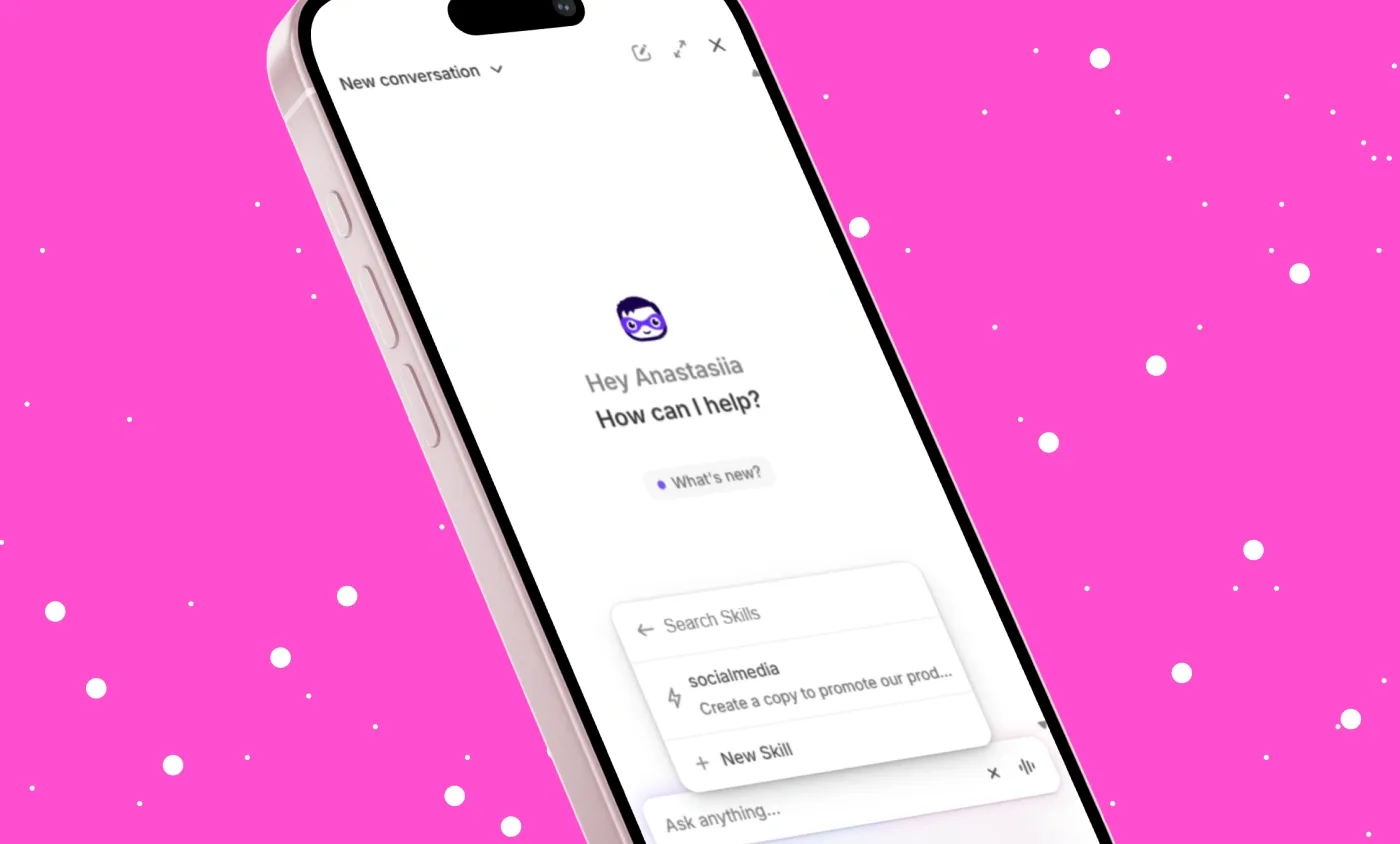
You can reuse previously created prompts, instead of reentering the same requests for the recurring tasks. You can save up to 25 prompts, aka skills, to save time and even share them with other merchants. For example, you can use just one command for generating copy for social media posts or forecasting sales revenue for a specific time period.
To add a new skill:
Open a chat with SideKick in your Admin
Click '+' icon – Skills, and select New Skill
Name your prompt to use it with a shortcut
Provide SideKick with instructions, then click Save
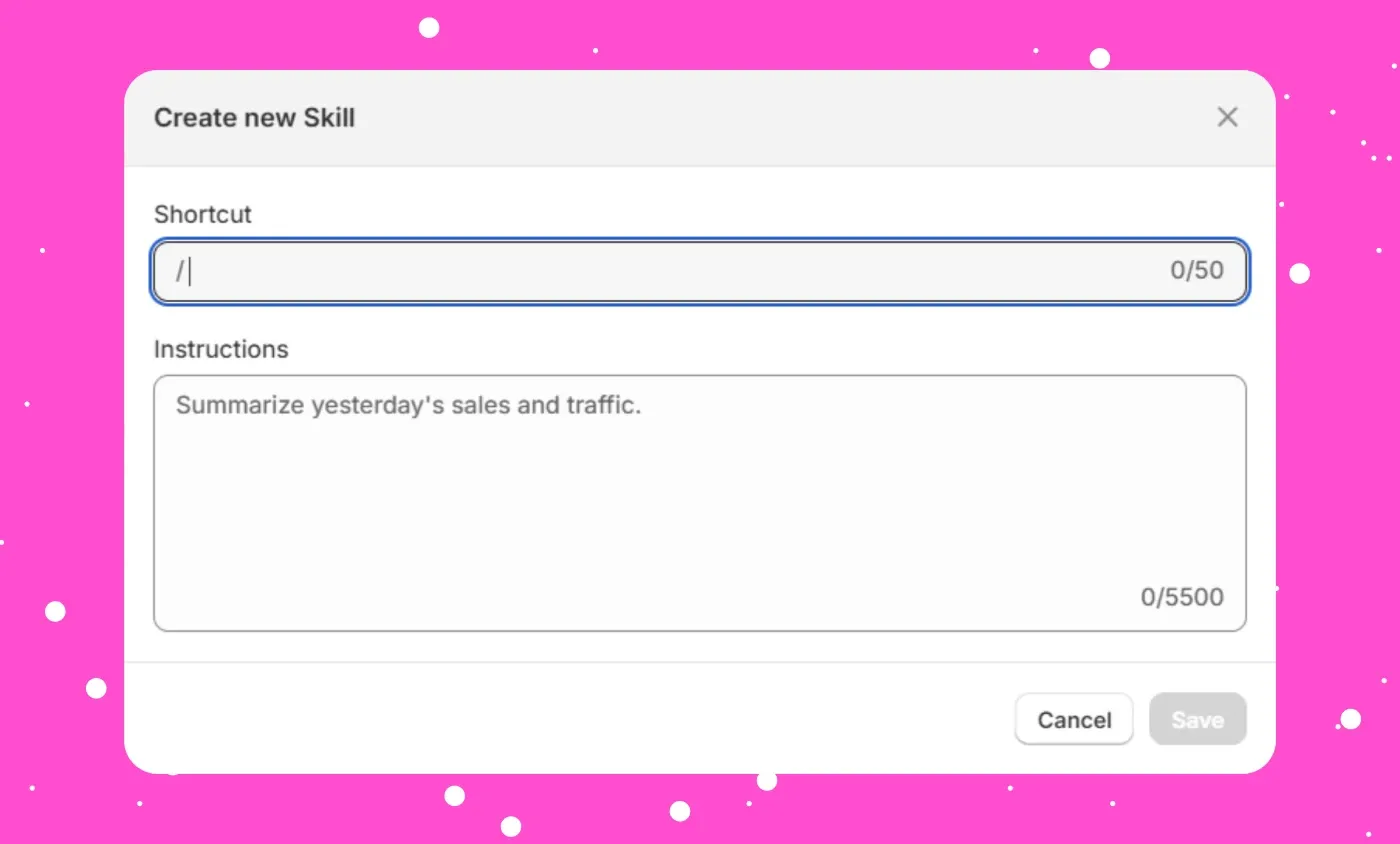
After that, you can find a new skill in the Skill section of SideKick, edit it, or create a new one.
Agentic

Agentic is probably the category that will continue to expand, as the Shopify team releases more updates for making stores visible in AI chats like ChatGPT. Now, in this category, you will find only one update that's planned to be released soon – Agentic Storefronts.
Agentic Storefronts
Shopify is working on a feature that will let you manage how your products appear in AI chats, such as ChatGPT, Copilot, and Perplexity. This feature has not been released yet, but you can enter your email address on the Shopify Winter Edition page to get notified once it goes live.
With the new functionality, you'll be able to set up the default listing and specify the information for the product fields you want to display in AI chats.
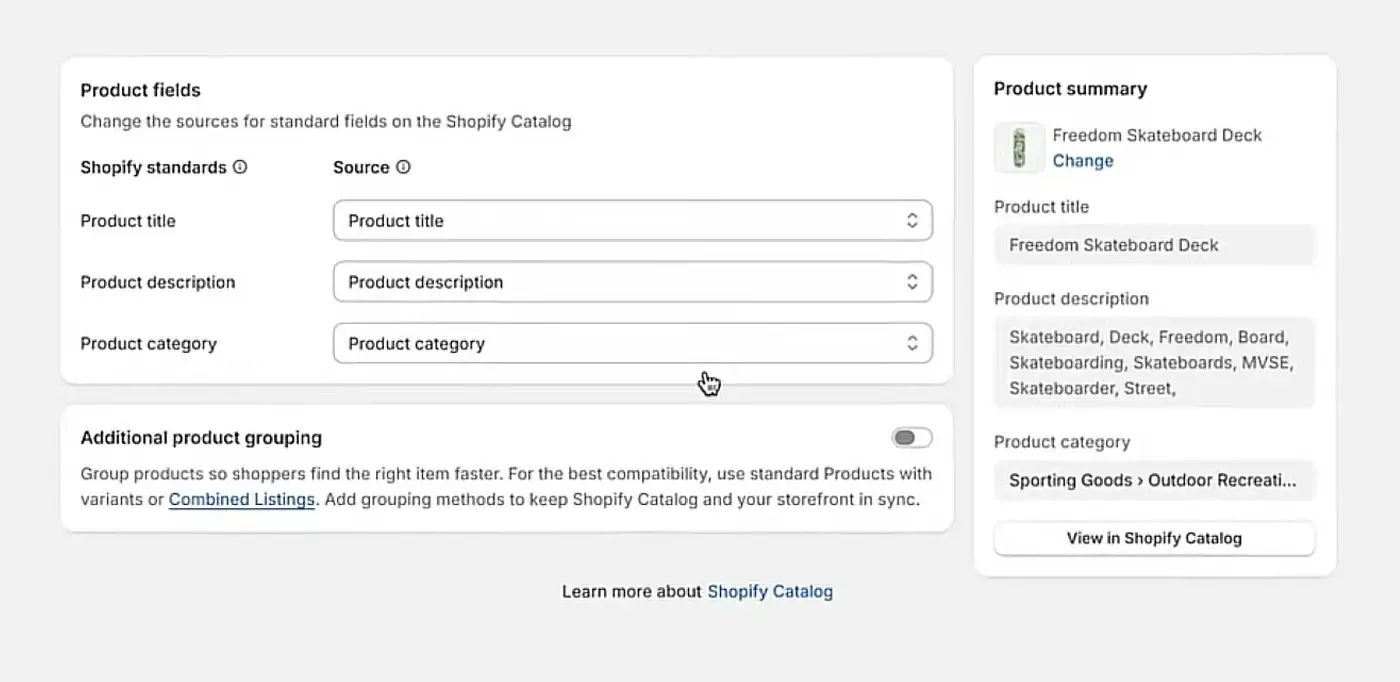
Users who find your products in these chats will have an option to proceed to checkout right from the conversation. Still, you'll see which AI channels are your sources of traffic and sales in Shopify Analytics.
There will also be available the Knowledge Base with the frequently asked questions (regarding return policy and more) and the answers you want to show to ChatGPT and other AI agents.
Online

There is a lot in the Online category you might find interesting:
Manage store details in the theme editor
Theme generation on mobile
Over 250 Horizon theme improvements
Unlisted product status
Automatic discounts for eligible customers
Combine bundle options
Improved theme discovery
Autofill passcode on iOS 26
Customer sign-in with social accounts
Customizable sign-in copy
2048 variants per product
Collections improvements
Compare-at prices in catalogs
Unit pricing for all
AI-powered domain discovery
AI-generated theme before signup
Faster customer login with Shop
Customers can edit their email addresses
Next, we provide a more detailed review of the Shopify updates we find the most important in this category.
Rollouts
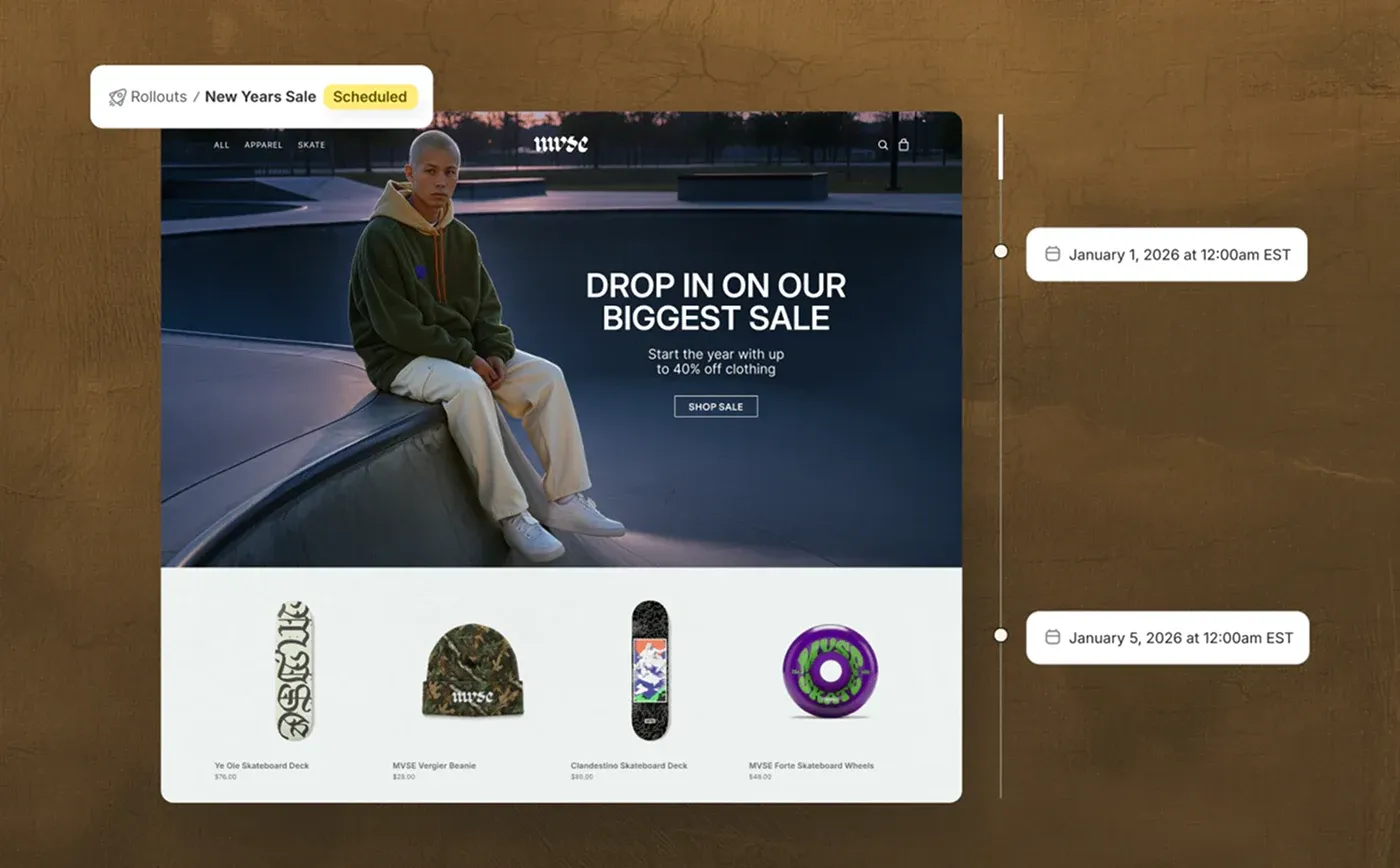
Another feature in early access is Rollouts by Shopify. It's intended for scheduling theme changes and conducting A/B tests right from the Admin. In the coming months, you'll be able to coordinate rollouts across products, discounts, and more, and specify the amount of traffic you want to direct to the newly rollout feature for the A/B test.
Shopify SimGym app
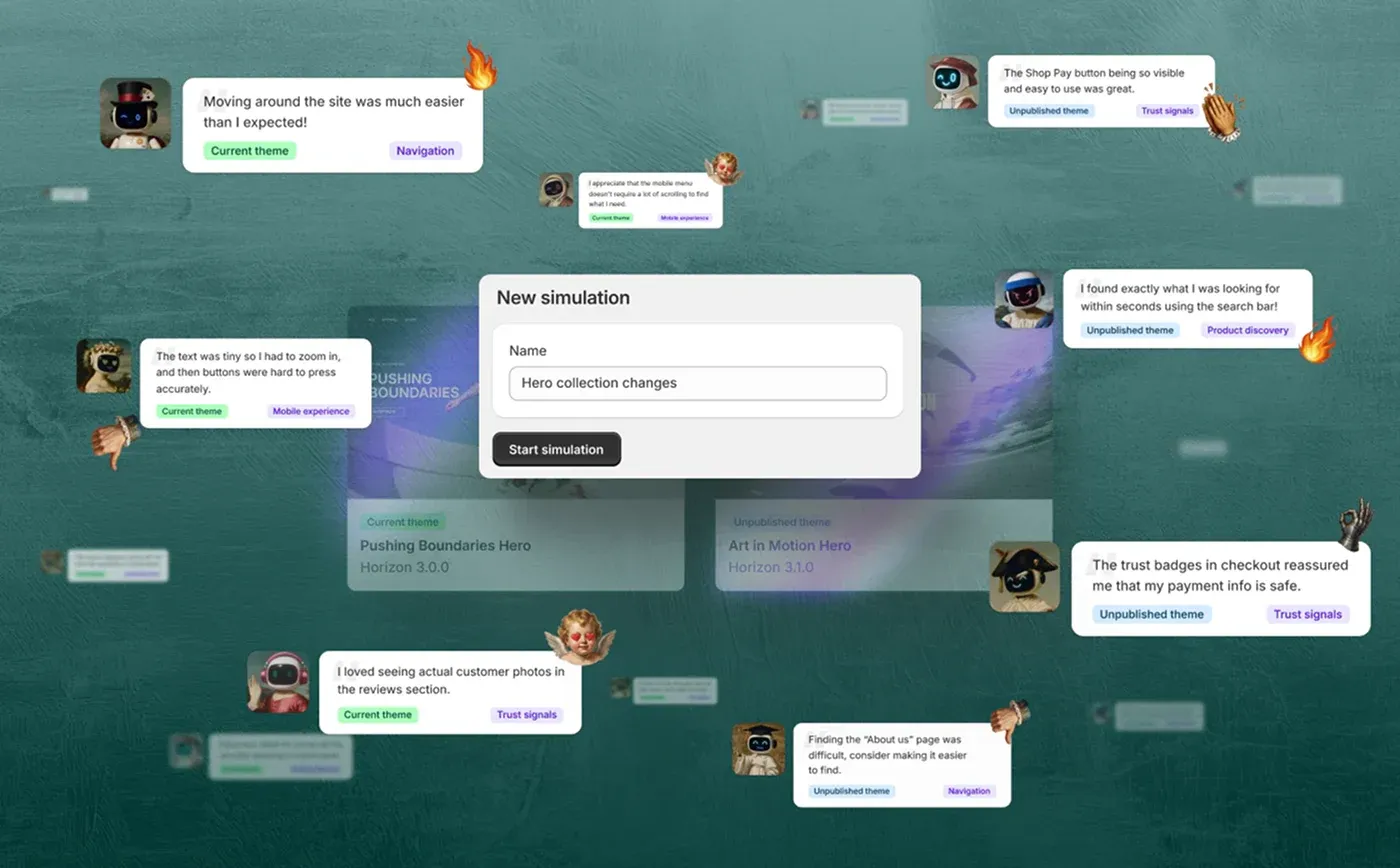
Shopify SimGim is a new AI-powered app that lets merchants check how their new store features impact user experience before making them available to real shoppers. How is it possible? The app simulates customer behavior using AI algorithms that were trained on real user actions. Based on this preview, you can see the future impact of new features on the add-to-cart rate and get recommendations on how to improve the experience before the actual launch.
Sell on WordPress
With the Sell on Wordpress app and the Shopify plugin on WordPress, you can connect your Shopify business to any WordPress site to display your products and manage sales through the Shopify Admin. Minimum requirements for the WordPress site to use this feature are a 5.0 or higher WordPress version and a 7.4 or higher PHP version.
Lovable for Shopify
You can now use the Lovable website generator to build and customize your Shopify store using powerful AI tools tailored to ecommerce. With this tool integrated with your Shopify store, you can manage your development process by using prompts, telling which type of store you want to create and which product you want to sell. Lovable can create everything from Shopify product pages and collections to checkout and cart, without the need for you to dig deeply into the code.
Tinker app
The Tinker app by Shopify, which is now in early access, will let merchants use premium AI design tools, such as Image Editor and Animated Icon Creator, from a single place. This app will lower the cost of accessing cutting-edge tools and provide you with an opportunity to quickly create stunning visuals to bring your ideas to life without hesitation.
Retail

Merchants who handle in-store operations have a lot to enjoy in the Retail category of Shopify Winter Edition 2026.
The only hub with processing power
POS Hub-compatible scanners
Quick count with POS
POS customization in one editor
Same-day delivery with Uber Direct
Markets for retail with POS Pro
QR code payments
Cartes Bancaires accepted on POS
Customizable return receipts
Refund selections on POS
Retail payments in Luxembourg, Switzerland, and the Czech Republic
Tap to Pay on iPhone in Germany, Ireland, Spain, and New Zealand
Receive transfer shipments in-store
Better in-progress return visibility
In our Shopify developers' opinion, the most valuable update here is subscriptions on POS.
Subscriptions on POS
You can now allow your in-store customers to sign up for subscription products via POS using the Shopify Subscriptions app. To sell subscriptions in-store, you need to follow these recommendations:
- Install the Shopify Subscriptions app or any relevant third-party app.
- Assign subscriptions to your products and add a subscription cancellation policy.
- Have the Shopify POS app version 10.13 or higher.
- Use Shopify Payments.
Using this feature, you can manage subscription-based products in your offline store with the same flexibility as you do within your online store.
Marketing

Shopify Marketing doesn't stay still, offering more features for merchants seeking to promote their products.
Shop Campaigns expands to the online store
Shopify Messaging supports SMS marketing
Auto-translation for Shopify Forms
Improved segmentation template search
Target all audiences in one Shop Campaign
Segment customers with product categories
Dynamic product sections in emails
Shopify Forms marketing consent
Shop Campaigns on more channels
Improved email customer segmentation
Calendar view for messaging
Web pixels on customer accounts
The feature we find especially helpful for merchants looking to boost their revenue is Shopify Product Networks.
Shopify Product Networks
If you're running your business in the US, you're eligible to use the Shopify Product Network app to add products to your store from the catalogs of other merchants. With this feature, you can choose at which pages to show these additional products, let your customers buy from multiple providers within a single checkout, and earn commissions without hassling about shipping and stocking purchased products.
Checkout
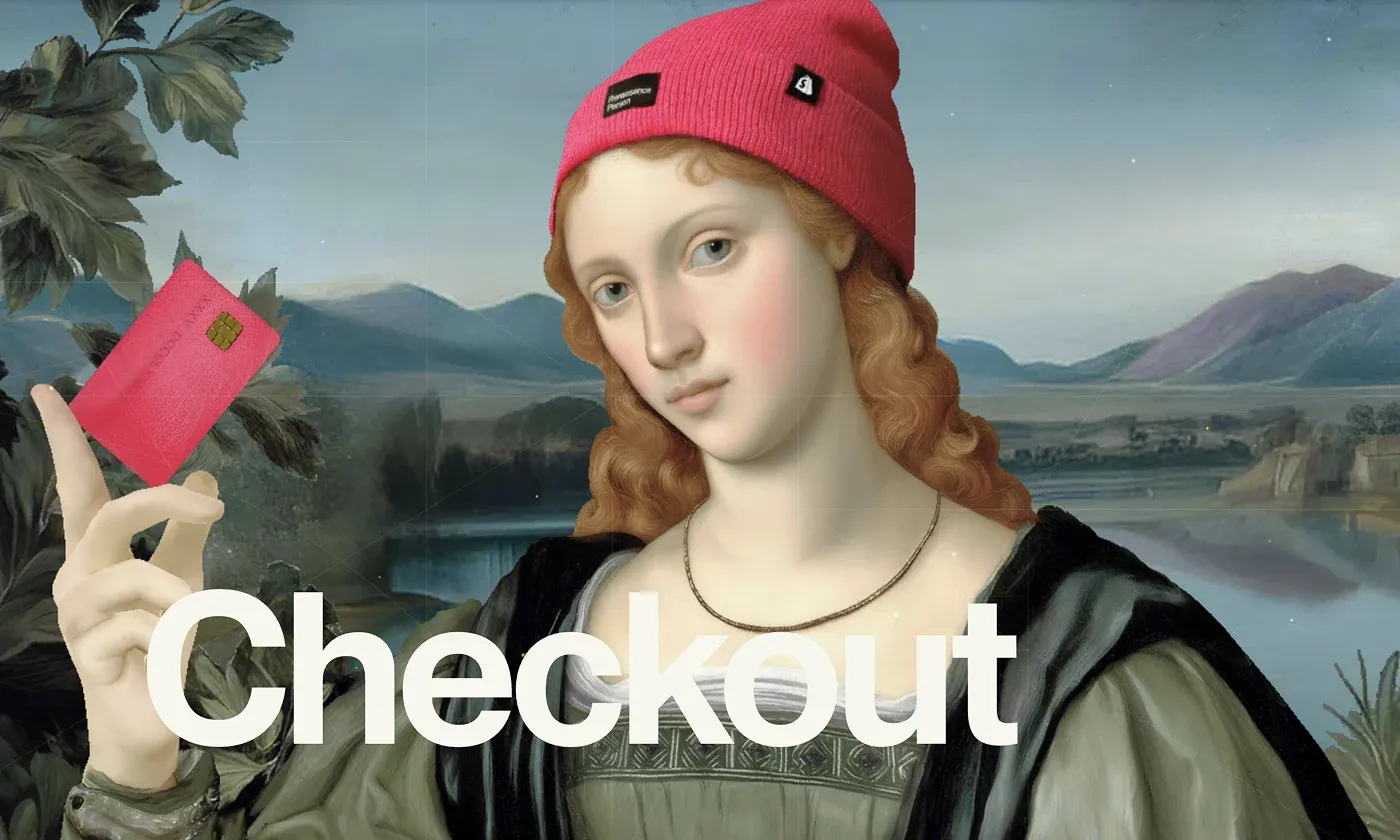
The Checkout section is full of useful updates you might find highly valuable.
Personalized Shop button
Shop Pay Installments in the UK
Apple Pay in Shop Pay
Switch to Shopify Payments with zero downtime
More payment methods in France
Shop Pay works with Global-e
Reminders for Shop Pay subscriptions
Streamlined Shopify Payments onboarding
Klarna in more countries
Our Shopify web development company considers the next update the most important in the category.
Checkout and accounts customization per market
Soon, you will be able to adapt your checkout experience for different markets if you have them created. For example, you can promote sales on an order status page for customers in a specific market or add banners with specific messaging to your checkout for a certain market. This feature will be available only for stores on Advanced and Shopify Plus plans.
Operations

You will find many changes and enhancements in the Operations category, such as:
Quick sale in the Shopify mobile app
Updated metrics and widgets for Apple Watch
AI-enhanced chargeback management
Heatmaps in analytics
Bot filtering in analytics
Precise date and time controls for analytics
Single-view analytics for multiple stores
More order filtering capabilities
Smarter safeguards for inventory updates
Preview workflow results in Flow
Cancel workflow runs in Flow
Enhanced Managed Markets
Password-free login
Customizable top items in analytics
Comprehensive inventory history
Flash sales with multi-location inventory
Bin locations in the Order Printer app
Edit unfulfilled orders with duties
Discounts on fulfilled items
Redesigned Flow editor
Store credit email notifications
The feature we paid special attention to is inventory transfers.
Flexible inventory transfers
You can now create inventory transfers for your active store locations without specifying the destination location. This can be helpful when you receive or ship inventory to suppliers where the destination location is unknown or irrelevant. Transfer statuses could be Draft, Ready to ship, In progress, Transferred, or Cancelled. This way, you can even edit processed transfer details to handle more real-world inventory scenarios.
Shop app

Shop App got new features and improvements with the Winter 2026 Edition so that you can enjoy:
Dynamic storefronts with relevant products for each shopper
Deals feed with price drops and discounts
Customizable product pages
Order tracking in 21 more countries
Better product discovery in Shop Minis
We would like to draw your attention to AI-powered solutions for editing shoppable videos.
Shoppable videos
You can display shoppable videos in the Shop App to better showcase your products and let customers discover them in the Shop App's home feed. To add this kind of video, you need to install a supported app, such as Firework or Sauce, create and publish the video. It will be automatically synced with the Shop App feed.
B2B

If you're into wholesale, the Shopify Winter '26 Edition has something to offer:
ACH payments for B2B
Suppliers can discover retailers with Shopify Collective
Payment requests per fulfillment for Plus
Store credit for B2B
Dynamic payment terms and deposits
New B2B-compatible apps
NetSuite, BrightPearl, Fulfil, Sage, and Acumatica ERP systems integration
Shopify and EDI workflows connect
Create rules for order review
Instant product imports for retailers
Improved product import for retailers
Horizon themes work with B2B
Our specialists find the next two updates the most helpful in this category.
Shopify Collective available globally
The Shopify Collective program is now available in 35 more countries, making it easier to source and sell products of other Shopify brands directly from the Admin. Except for the US, Canada, and the UK, you can now use this feature in the majority of EU countries, such as Romania, Spain, and others, as well as in Japan, Mexico, and Hong Kong.
Pick up in store for B2B
Since B2B customers may require different shipping options to reduce delivery costs, Shopify provides an opportunity to process B2B orders using the in-store pickup option. It's turned off by default, but if you're using Shopify B2B solutions within your Plus plan, you can activate this feature by contacting the Shopify support team.
Finance

Here is the complete list of updates in the Finance category:
Automatic transfers in Shopify Balance
Staff cards with spend controls
Shopify Capital in more European countries
Credits on USDC transactions
Unified card dispute
Dynamic credit limits
Real‑time fraud alerts for Shopify cards
Track international profit margins
Same-day ACH transfers
Increased Shopify Credit rewards cap
Add checks in Shopify Balance
Growing businesses, though, may find the Shopify Capital flex account the most helpful improvement in this category.
Continuous funding with the Shopify Capital flex account
The US-based merchants who need additional funding to grow their businesses can use the Shopify Capital flex account to get access to loans for dynamic borrowing capacity with adjustable repayment rates. This feature is in early access and will only be available for those who use the Shopify Capital tool.
Shipping

Shipping becomes even more convenient with the updates rolled out in this category:
FedEx return labels
Custom sender name on labels
Expanded US and Canada cross-border labels
In-progress fulfillment status
More logistics partners
More global shipping carriers
To avoid excess shipping costs, we recommend using the Default package per variant feature.
Default package per variant
The store default package is used to calculate the shipping rate to charge your customers during checkout when using weight-based or carrier-calculated shipping rates. The store default package is used for products and variants that don't have a custom package assigned.
Developer

The Shopify team released a lot of updates in the Developer category to improve work with agentic commerce, SideKick, apps and themes, tools and platforms, storefronts and extensions.
Here are some of these changes:
Regional admin performance data optimization
60-day grace period on Built for Shopify
Clearer app store requirements
Seamless workflows with the Admin Intents API
Faster bulk operations
Improved metafields and metaobjects
Tangle to build ML and data pipelines
Binary testing in Shopify Functions
Shop Minis SDK
POS Extensions Storage API
Explore all the released dev features in the Shopify changelog.
Let's see what our Shopify developers find the most helpful for their work among the updates of the Shopify Winter Editions 2026.
Checkout Kit for web
By using the <shopify-checkout> web component, you can embed the Shopify Checkout experience in web apps with a JS library that renders in a pop-up or a new tab. See how to work with the Checkout Kit for Web in detail.
Liquid support in Shopify dev MCP
You can now validate Liquid code in Shopify Dev Model Context Protocol (MCP) to catch errors before deployment. The update enables you to connect your AI assistant with the MCP server to search Shopify development resources, explore API schemas, build Functions, and get up-to-date answers. Explore more details on Dev MCP.
Shopify Functions replace Scripts in 2026
Starting June 30, 2026, all Shopify Scripts will stop functioning. You should migrate from Scripts to Shopify Functions before this date, otherwise, you may lose your checkout, payment, and shipping customizations.
What DigitalSuits can do for you after Shopify Winter Editions 2026?
If some of these new Shopify features sparked ideas for your store but you're not sure where to start, DigitalSuits will be glad to help.
Are you thinking about building an app with Sidekick? Want to improve your theme using the new AI tools? Or maybe you're preparing for the switch from Scripts to Shopify Functions? Our Shopify developers can jump in and handle the technical side so everything works smoothly.
If you're interested in the new checkout options, B2B tools, or international features, we can help you set those up too. We work a lot with Shopify Plus stores and custom Shopify integrations, so things like multi-market checkout or connecting ERP/CRM systems are right in our wheelhouse. Also, we offer Shopify B2B development and Shopify internationalization services so that you know your store works smoothly for wholesale customers and across multiple markets.
And if your goal is simply to boost performance or conversions, updates like SimGym, shoppable videos, or dynamic product content can really help. We can support you with Shopify CRO, Shopify design tweaks, and Shopify speed optimization to get the most out of them.
Finally, if you just want someone to keep your store up to date as Shopify keeps rolling out changes, our Shopify retainer plans take that off your plate. Don't hesitate to contact the DigitalSuits team. We keep an eye on every update and continue to upgrade our knowledge to keep the stores of our customers current and innovative to successfully compete in the market.

Written by
Anastasiia Moskvichova
Content Marketing Specialist
Anastasiia is an enthusiastic content writer who diligently researches and curates valuable information to craft engaging content tailored for readers with a keen interest in marketing, sales, and technology.











Was this helpful?
0
No comments yet